

Android & Edge Devices
Lifeboat’s GGUF engine runs on Android as a native arm64-v8a build inside an ordinary APK. One artifact covers a wide range of handsets: seven CPU variants from armv8.0 to armv9.2 are compiled as loadable backends and dispatched at runtime, so an old phone and a current one run the same file.
What the phone build can reach
Section titled “What the phone build can reach”| Backend | Hardware | Status |
|---|---|---|
| CPU (7 variants) | every arm64 handset | the dependable path, and often the fastest one |
| OpenCL | Qualcomm Adreno | works, including older Adreno 6xx — but see the benchmark below |
| Vulkan | Mali, Xclipse, and anything else exposing Vulkan 1.2 | works where the device reports 1.2; many mid-range handsets report 1.1 and are refused |
| NPU | Qualcomm Hexagon HTP | requires a compute-DSP RPC channel and HTP firmware that mid-range parts do not expose — see below |
The GPU is not automatically the faster choice
Section titled “The GPU is not automatically the faster choice”This is the single most important thing to know before enabling GPU offload on a phone, and it is the opposite of the intuition.
Measured on a Samsung Galaxy M51 (Snapdragon 730G, Adreno 618, Android 12), Qwen2.5-0.5B-Instruct Q4_0, running in the foreground app, warm-up excluded, median of three runs:
| Path | Prefill | Decode |
|---|---|---|
| CPU | 76.40 tok/s | 18.00 tok/s |
| GPU (all layers) | 18.65 tok/s | 3.89 tok/s |
The GPU is 4.7x slower. Run-to-run spread was 4% and 1%, so this is a measurement and not thermal noise.
The reason is that the GPU path is tuned for recent Adreno generations (7xx and newer, and the X-series in Snapdragon-powered laptops). Older Adreno 6xx parts are supported but untuned, and a low-end mobile GPU also shares memory bandwidth with the CPU it is meant to be relieving.
Choose the device yourself, from measured numbers
Section titled “Choose the device yourself, from measured numbers”Because no built-in rule can be trusted across the whole Android range, the console lists every device the engine can reach and lets the handset answer the question.
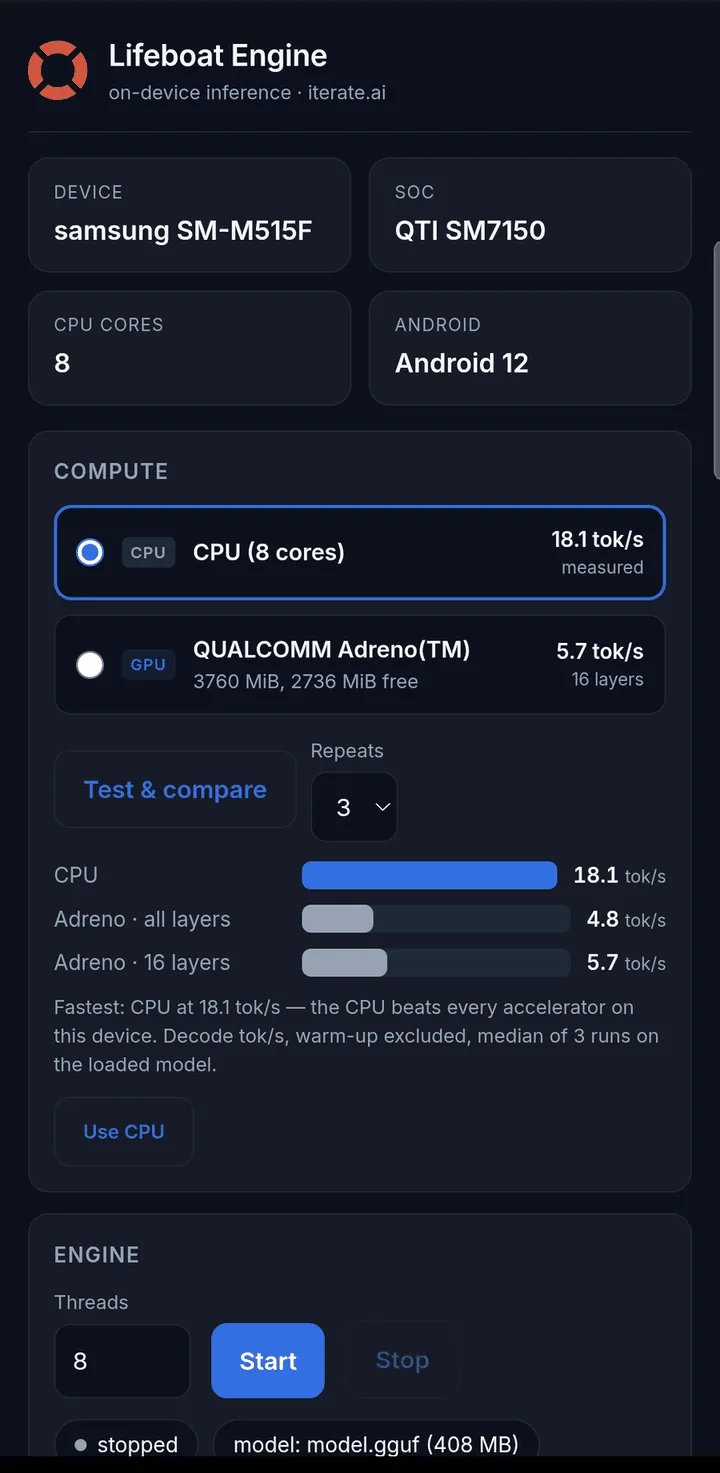
Test & compare measures each candidate — the CPU, each accelerator at full offload, and a partial CPU/GPU split — and charts them side by side. The fastest is named, and one tap adopts it. In the screenshot above, the run on a Galaxy M51 produced:
| Arm | Decode |
|---|---|
| CPU | 18.1 tok/s |
| Adreno, all layers | 4.8 tok/s |
| Adreno, 16 layers | 5.7 tok/s |
Two things that table shows and a rule of thumb would miss: the CPU wins outright on this part, and the partial split is 1.2x faster than handing the GPU everything. The GPU layers slider is there for exactly that case.
Lifeboat still ships a sensible default so the first run is not a blank page — an Adreno 6xx starts on the CPU, which on the measured handset is the difference between 3.9 and 17.2 tok/s — but the default is a guess and the comparison is a measurement. Prefer the measurement.
Your choice is remembered, and it pins both the layer count and the device, so a machine with two accelerators serves from the one you picked.
Quantization changes the GPU result several-fold
Section titled “Quantization changes the GPU result several-fold”On the same device and the same model, Q5_0 weights gave the GPU 1.29 tok/s against Q4_0’s 3.89 — a third of the throughput — because the mobile GPU path is built around Q4_0 and other formats fall back to a generic route.
For phone GPU offload, prefer Q4_0. And when comparing any two mobile GPU figures, check they were taken on the same quantization; otherwise the comparison is measuring the format, not the device.
Benchmarking a handset honestly
Section titled “Benchmarking a handset honestly”Phones are not servers, and three things will produce a wrong number if you skip them. packaging/android/bench-android.sh enforces all three.
Take repeats and report the median. The same CPU arm on one handset returned 1.86, 7.30 and 11.31 tok/s across three runs — a 6x spread from thermal and power management alone, same binary, same model. The script defaults to three repeats, prints every sample, and flags anything over 25% spread as unsafe to publish.
State the offload level explicitly on both arms. Leaving it unset does not mean “CPU” — it means whatever the build’s own policy decides, which silently changes what is being measured.
Measure inside the foreground app. A process launched over a debug shell is placed in the background scheduling group and is confined to the small cores, which understates the CPU by roughly 1.3x.
The NPU
Section titled “The NPU”Handset NPUs are not currently a path to faster inference here, and the reason is more specific than “the chip is too old”.
The GGUF engine’s NPU support targets Qualcomm’s Hexagon Tensor Processor and reaches it through the compute-DSP RPC channel. On a mid-range part such as the Snapdragon 730G, that channel is not exposed to applications at all — the device registers only its audio-DSP domains, and carries no HTP firmware for the engine to load. The separate dedicated NPU block on the same chip is reachable only through the vendor’s own proprietary runtime, which is a different software stack rather than a setting.
The practical consequence: on current handsets, plan around the CPU, treat the GPU as a per-device question to be measured rather than assumed, and treat the NPU as unavailable.
Serving
Section titled “Serving”Start the engine and it exposes the same OpenAI-compatible API as every other Lifeboat deployment, on the device itself. The console includes a chat pane and a live engine log for checking a model without leaving the handset.
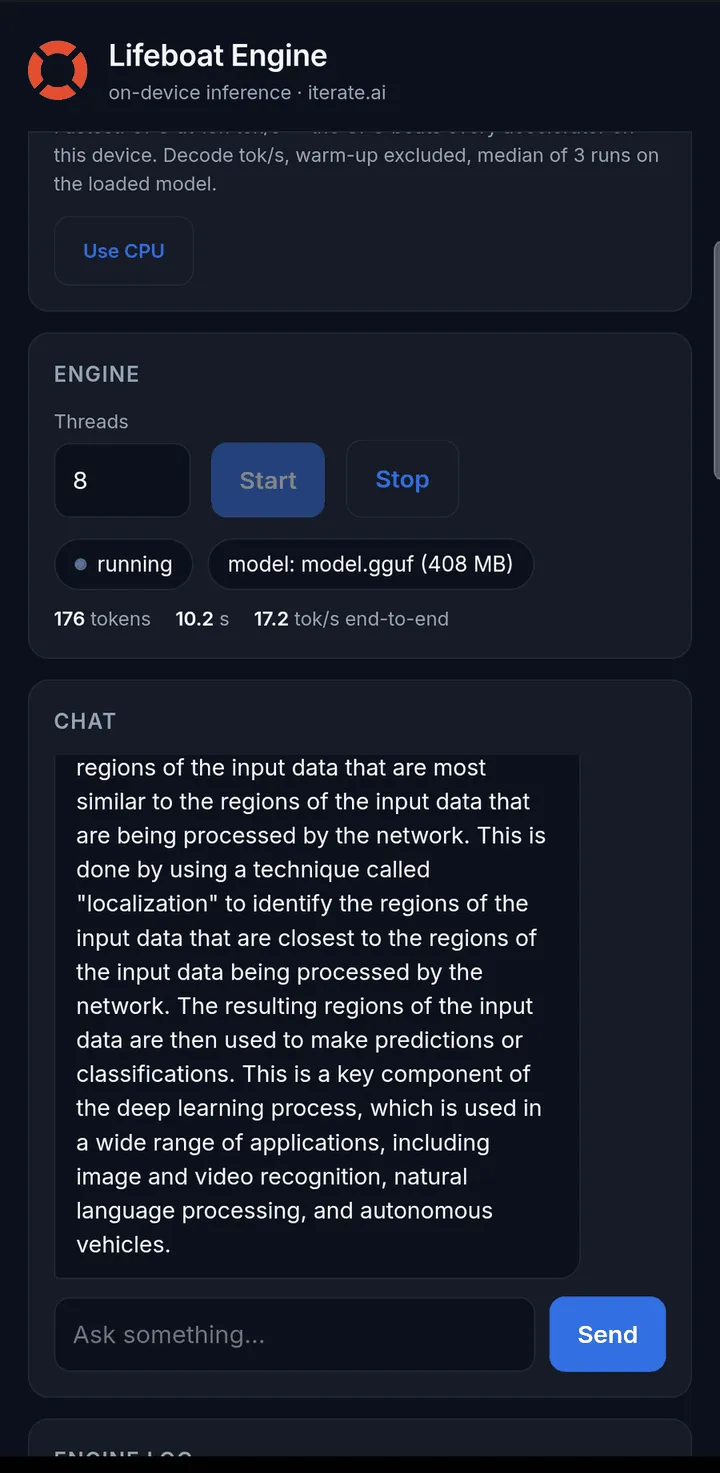
Throughput measured end to end through the API on that handset — 17.2 tok/s — lands where the decode benchmark said it would.
Sizing
Section titled “Sizing”Decode speed on a phone is bound by memory bandwidth, so the model size is the decision that matters most:
- 0.5B–1.5B at 4-bit — comfortable on a mid-range handset, and the range where interactive use feels responsive.
- 3B–4B at 4-bit — workable on a recent flagship with 8 GB or more.
- 7B and above — expect to wait; a phone has neither the bandwidth nor the thermal headroom to sustain it.
Time-to-first-token, not generation speed, is what dominates on a low-core device, and smaller models improve it disproportionately.